





Video campaign groups are a Google Ads feature that lets advertisers set one shared reach or frequency goal across multiple YouTube campaigns, while each campaign keeps its own budget, bidding and creative. The feature became available globally on 13 July 2026, and it fixes a problem that has been costing video advertisers money for years: no easy way to see or control how often the same person is shown ads across several campaigns at once.
Google’s case for caring rests on its own research. A Meridian marketing mix modelling study of around 600 US brands, built on data from 2023 to 2025, linked an optimal frequency of 2.7 exposures a week to a 19% lift in ROI. That figure comes from Google, about a Google product, so treat it as a benchmark rather than gospel. The logic behind it is sound, though. Too few exposures and nothing sticks. Too many and you are paying to irritate people. The difficult part has never been agreeing a sensible target. It has been hitting one once three or four campaigns are running in parallel, each with its own frequency settings and no shared control over how they overlap.
The problem this actually solves
Picture a UK retail brand running a broad awareness campaign, a seasonal promotion and a retargeting campaign on YouTube at the same time, all loosely aimed at the same audience. Each has a sensible frequency cap, set with the best intentions. What none of the three can see is that a decent slice of viewers is being served ads by all of them, pushing actual weekly frequency well past the useful range, while a different part of the target audience sees almost nothing.
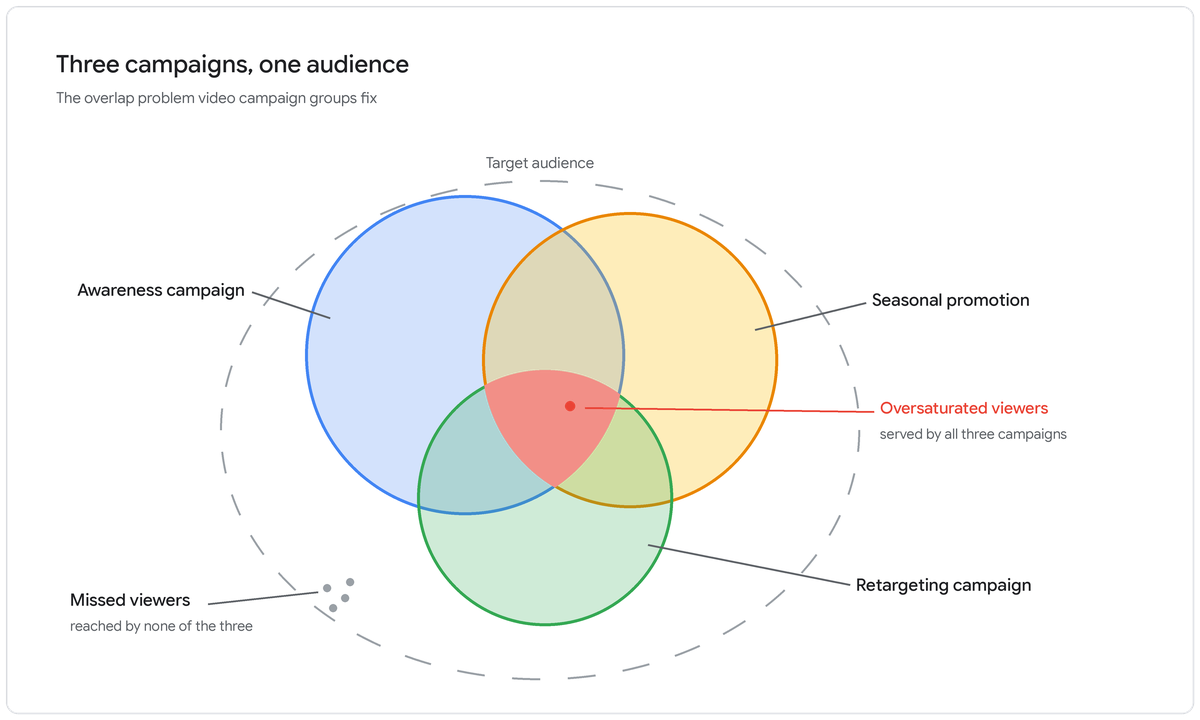
Reach is how many unique people saw your ad. Frequency is how many times each of them saw it. Manage those numbers per campaign and you are optimising three separate pieces of a puzzle you can’t see the whole of. Manage them as a group and Google coordinates delivery instead, steering impressions away from people who have already seen plenty and towards the ones who haven’t.
Individually managed campaigns vs a video campaign group
If the table extends beyond the screen, scroll sideways to view all columns.
| Area | Managing campaigns individually | Using a video campaign group |
|---|---|---|
| Frequency control | Set and tracked per campaign only | One shared goal across every grouped campaign |
| Audience overlap | Invisible, campaigns compete for the same viewers | Coordinated, delivery is balanced across the group |
| Reporting | Reviewed campaign by campaign | Group-level unique reach, average frequency, cost and impressions |
| Budget and creative | Set per campaign | Unchanged, still set per campaign |
The fine print: which campaigns actually get optimised
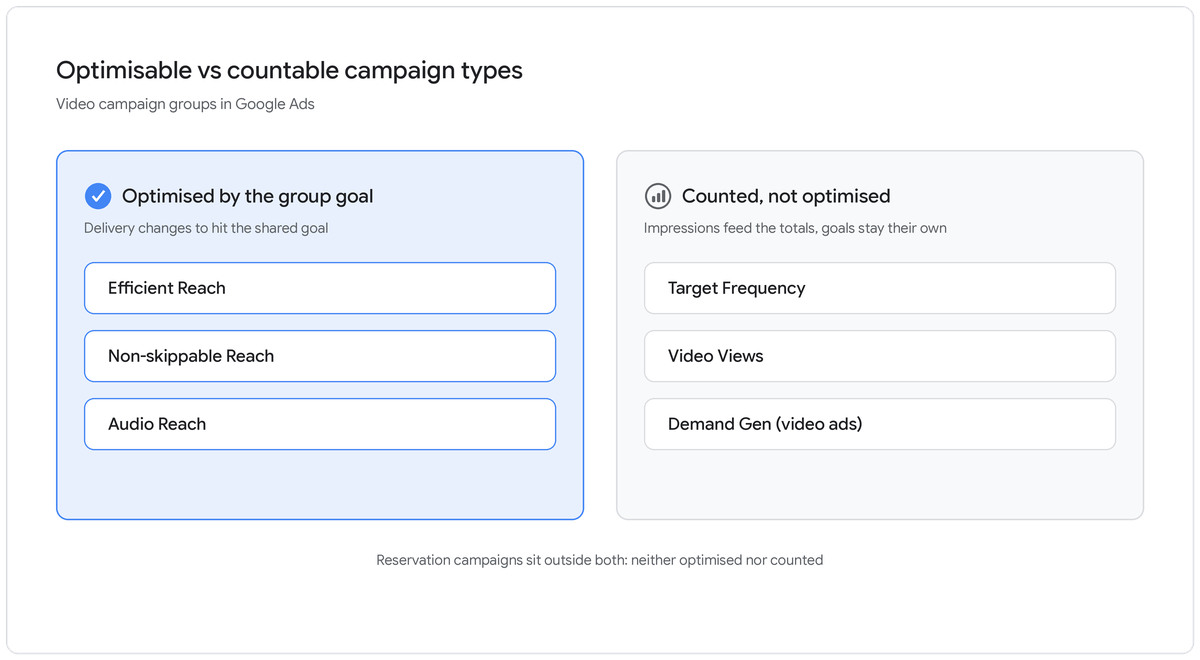
This is the part most of the launch coverage skipped, and it decides whether grouping does anything useful for you. Google’s help documentation splits campaign subtypes into two camps. Optimisable campaigns respond to the group goal and change how they deliver. Countable campaigns carry on chasing their own objective, but their impressions still feed the group’s totals, so the optimisable campaigns know who has already been reached.
If the table extends beyond the screen, scroll sideways to view all columns.
| Campaign subtype | Optimised by the group goal | Counts towards group totals |
|---|---|---|
| Efficient Reach | Yes | Yes |
| Non-skippable Reach | Yes | Yes |
| Audio Reach | Yes | Yes |
| Target Frequency | No | Yes |
| Video Views | No | Yes |
| Demand Gen (video ads) | No | Yes |
| Reservation | No | No |
The practical consequences matter more than the table. A group needs at least one optimisable subtype in it, otherwise there is nothing for the shared goal to act on, and Google suggests putting at least half the group’s budget behind those tCPM campaigns. A retargeting campaign built on Video Views or Demand Gen won’t change its behaviour inside a group, though its exposure data still helps the reach campaigns steer around people it has already served. Google also advises keeping Target Frequency campaigns out of any group optimising for frequency, because they will keep chasing their own campaign-level target and ignore the group’s. And the whole mechanism applies to YouTube inventory only.
How to set up a video campaign group
- In Google Ads, open the Campaigns menu, go to Campaign groups and create a new group, choosing Video campaign group as the type.
- Name the group and add the campaigns you want it to manage. Start with the ones whose audiences genuinely overlap, since that is where uncoordinated frequency does the most damage.
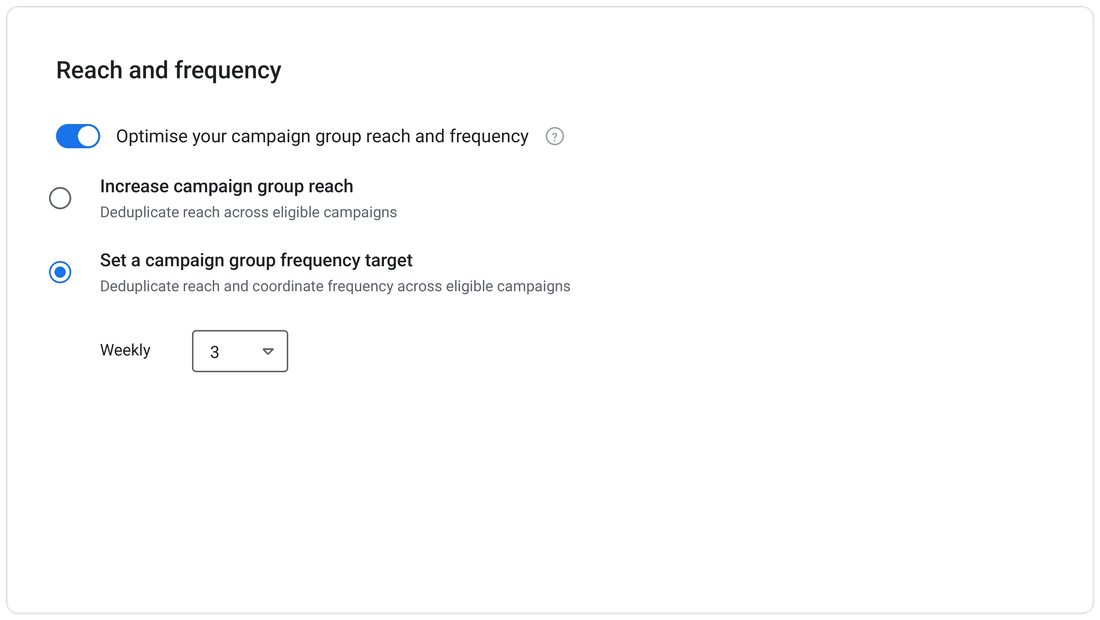
- Tick the option to optimise the group for reach and frequency, then pick a goal: increase campaign group reach, which deduplicates unique viewers across the eligible campaigns, or set a campaign group frequency target, a weekly figure between 2 and 7. Google recommends 3 in the product itself, which lines up with the 2.7 finding from its Meridian research.
- Loosen or remove frequency caps on the individual campaigns. Google warns that tight campaign-level caps can stop the group ever reaching its shared goal. Budget, bidding and creative stay exactly where they were.
- Keep audience targeting broad across the grouped campaigns. Google’s best practice here is demographic or affinity audiences rather than restrictive contextual layers like keywords or placements, since the group can only balance delivery among people its campaigns are allowed to reach.
- Give it a week before judging anything. The system needs time to learn, and Google advises against frequent changes to targeting, bids or goals mid-flight. Newly created campaigns produce the cleanest results, which makes grouping something to build into your next launch rather than only retrofit onto old activity.
- Review performance at group level. The Campaign groups tab shows unique reach, average frequency, cost and impressions, while the Brand report under Insights and Reports breaks deduplicated reach and frequency down by age and gender. Know the quirks before you panic at empty tables: reach data only appears once campaigns pass 10,000 impressions, reach metrics run to a maximum window of 92 days, and frequency distribution needs a date range of 31 days or fewer. For the clearest read on whether delivery is genuinely being balanced, build a Unique Reach report from the templates in the main Reports section, which pairs group-level reach on an executive summary tab with a campaign breakout showing how frequency is spread campaign by campaign. Only checking the individual dashboards defeats the point of grouping in the first place.
The full setup detail sits in the video campaign groups article in Google Ads Help.
Who should be using this (and who shouldn’t)
If you run more than one YouTube campaign at a time, whether that is awareness alongside a product push or activity split by region, device or audience, this is worth setting up before your next planning cycle. The gains are largest where the overlap is worst: broad targeting and several always-on campaigns aimed at roughly the same people.
Skip it if you run a single standalone video campaign. There is no overlapping delivery to coordinate, so a group adds admin without adding value. Teams buying YouTube through Display & Video 360 have an equivalent already, since the DV360 Help Centre documents insertion order level reach and frequency optimisation with the same 2 to 7 weekly range, and Google’s help page now says the feature is also available in Display & Video 360.
Getting the balance right
The brands that gain most from this are the ones already running several video campaigns with no clear view of how they overlap. Holding the right frequency across a whole group, rather than guessing at it campaign by campaign, is the difference between paying to oversaturate one segment of your audience and actually landing in the band the research points to.
It’s also easy to get wrong without noticing. A group full of countable campaigns optimises nothing. Campaign-level caps choke the shared goal. Narrow targeting starves the system of room to work. And one creative shown three times a week wears thin fast; Google’s guidance for target frequency campaigns is to run at least as many distinct ads as the weekly number you are chasing, which is worth honouring at group level too. If you would rather not learn any of that on live budget, our paid media team will review your current YouTube structure, map where your audiences overlap, and build the group into your next campaign properly. Contact our team to get started.