



This guide covers what WordPress 7.0 introduced. WordPress has moved on since: 7.1 “Mary Lou” came out on 19 August 2026, the current release is 7.1.4, and 7.2 is due on 8 December 2026. If you are planning an upgrade, test against the current release, not 7.0.
WordPress 7.1.4, released on 28 October, is a security release. Its fixes include a flaw in the upgrade process that can allow remote code execution, and Wordfence reports attackers already trying to exploit it. Most sites update automatically, but check under Dashboard > Updates that yours is on 7.1.4, or on 7.0.8 if it is still on the 7.0 branch.
The short version. Here’s what’s new in WordPress 7.0 ‘Armstrong’, which went live on 20 May 2026. The headline change: native AI is now built into the platform itself. WordPress core handles the connections to AI services, so you bring OpenAI, Anthropic, Google, or whichever provider you fancy, and the same connection layer routes everything. A separate, optional plugin adds the bits content teams will actually use day-to-day. Image generation, alt text, draft titles and excerpts, that sort of thing. Real-time co-editing was meant to headline the launch but was deferred from the 7.0 release. PHP 7.4 is now the minimum; 8.3 is what the project recommends running. What follows is the version of all this that marketing directors and brand owners need.
AI in WordPress has, for the past three years, meant one plugin per feature: each vendor with its own provider, its own settings page, and (usually) its own invoice arriving every month. 7.0 is the release that dismantles that pattern. The platform now ships with the connection layer, the shared vocabulary plugins use to expose their capabilities, and a single admin screen for managing AI providers. For UK marketing teams already paying for half a dozen AI subscriptions on top of WordPress, the consolidation has started. Worth understanding now rather than at renewal time.
Matias Ventura led the release, with more than 875 contributors and over 200 first-timers delivering more than 420 enhancements and fixes. WordPress itself describes 7.0 as marking ‘the start of a new era, laying the foundation for AI across the WordPress experience’. The direction couldn’t be clearer.
Below: what’s new in WordPress 7.0 through a marketing operations lens, what’s been held back, and what to put on the agenda with your agency or in-house developer this week.
What’s new in WordPress 7.0: the AI changes at a glance
A scan of the AI changes, before we get into the detail:
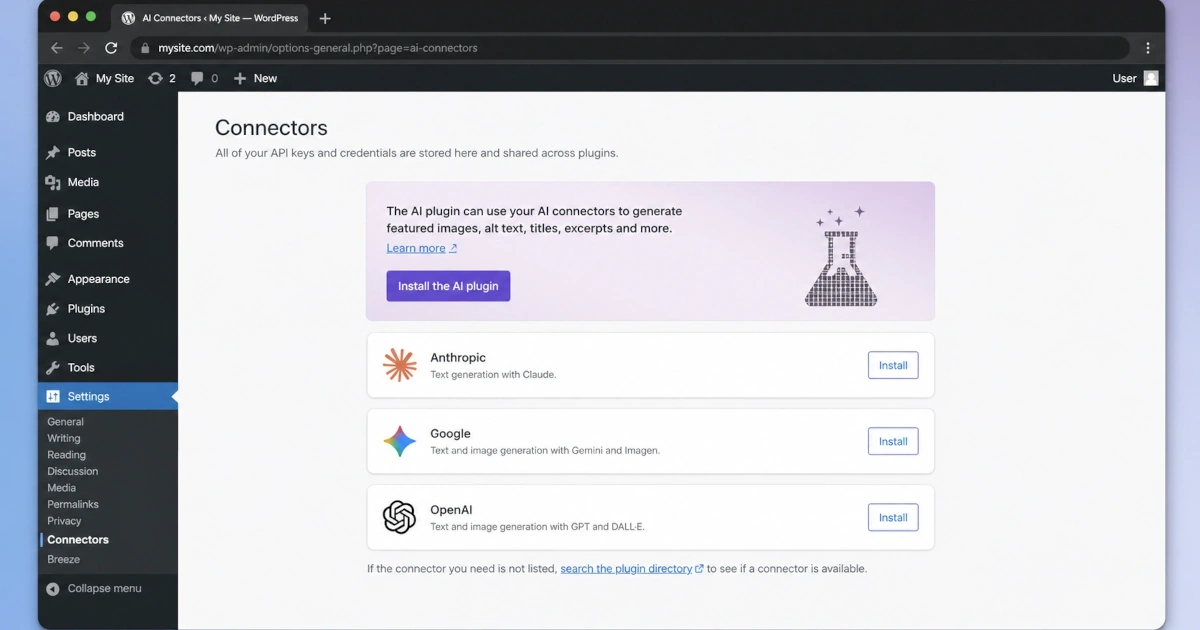
- AI provider connections (OpenAI, Anthropic, Google, or custom) are now managed from one admin screen at Settings > Connectors.
- The WP AI Client is a built-in connection layer plugins use to talk to AI services without each having to carry its own credentials.
- The Abilities API: a shared way for plugins to publish what they’re capable of, so AI tools can call on those capabilities instead of each one duplicating the same work.
- A separate optional AI plugin (manual install) layers on the visible features: image generation and editing, suggested titles and excerpts, drafted alt text.
- Nothing AI-related runs until an administrator switches it on. A stock 7.0 install is no more AI-active than a stock 6.9 install.
What counts as ‘native AI’ in WordPress 7.0?
Three pieces of core code, working together. The WP AI Client does the actual talking to AI services. The Abilities API gives plugins a common way to publish what they’re capable of. And the Connectors hub is the single admin screen where providers get configured, keys get pasted in, and features get switched on. Anything you read about ‘native AI in WordPress 7.0’ refers to one or more of those three. Together, they retire the old approach of one plugin per AI feature, each with its own vendor relationship.
Why does AI in WordPress matter for my business?
Because AI control is now centralised. Before 7.0, AI policy on a WordPress site was distributed across plugin settings pages, each with its own credentials and commercial terms. After 7.0, you make one decision about provider and policy. That decision then propagates to every compatible plugin. For marketing teams that have been quietly adding AI features one at a time, the consolidation makes audit, governance, and cost control practically possible for the first time.
How does the WP AI Client work?
Easiest way to picture it: a translator. The WP AI Client introduced in ‘Armstrong’ takes whatever’s coming from your installed plugins and converts it into the right shape for whichever AI service you’ve connected. Anthropic, Google, OpenAI, your own custom endpoint, it doesn’t matter; from the dashboard’s perspective, they all look identical. Plugins talk to the AI Client. The AI Client handles the routing.
For a marketing team, the practical consequence is provider portability. The agency can switch the AI provider behind any feature without rebuilding it, and individual plugins no longer need their own credentials, settings, or subscriptions. If your team has been signing AI vendor contracts with one eye on a future where the market moves faster than you can keep up, the AI Client makes that future a lot less painful.
What is the Abilities API?
The Abilities API is a shared vocabulary plugins use to declare what they’re good at, so AI tools and other plugins can act on those declarations in a coordinated way. A booking plugin can announce ‘I can check availability for these dates’. An SEO plugin can announce ‘I can suggest a meta description for this page’. AI features built on top can then call those abilities, rather than each plugin reinventing the same logic from scratch.
The server-side foundations arrived in WordPress 6.9 in December. As the WordPress 7.0 Field Guide details, 7.0 adds the JavaScript counterpart, with a built-in UI and command palette of its own, allowing AI features to actually understand the specific site they’re running on. For business websites, the long-term consequence is groundwork for AI features that operate on real site data, not generic text generation with no context.
The Connectors hub: one screen for AI policy
It lives under Settings > Connectors in the WordPress admin. As laid out in the WordPress 7.0 Field Guide, three providers come pre-registered out of the box: OpenAI, Anthropic, and Google. Each has its own official provider plugin on WordPress.org, maintained by the core team: AI Provider for Anthropic, AI Provider for Google, and AI Provider for OpenAI. You paste an API key once, and every compatible plugin on the site uses that connection through the AI Client. One credential, one provider choice, everywhere.
For agencies running multiple sites, and for marketing teams setting AI policy across a brand, the Connectors hub is the screen where policy gets enforced. One set of decisions, in one place, instead of thirty plugin settings pages scattered across the admin.
Is WordPress 7.0 AI on by default?
No. The infrastructure is in the codebase, but it stays dormant until someone with admin rights switches it on. Think pipes laid down without the water turned on. Upgrade a site and walk away, and nothing AI-related fires: no copy gets drafted, no data gets pushed to a provider. Someone with admin access has to add credentials, set up a connection in the Connectors screen, and toggle features on individually. A stock 7.0 install with no extras behaves the way 6.9 did.
A separate, optional AI plugin extends the experience further, with image generation and editing, title and excerpt generation, and alt-text suggestions. That plugin is a manual install. It is not bundled with WordPress.
Commercially, the opt-in posture matters. For UK businesses bound by UK GDPR and a stack of client data protection agreements, the infrastructure is there when the organisation is ready to use it, and absent until then. Marketing teams can plan AI adoption on their own timeline, rather than reacting to features that have been activated without consultation.
What the optional AI plugin actually does
The optional AI plugin adds practical content-team features, all of which rely on a Connectors hub provider being configured first. It does the user-facing AI work: generating and editing images inside the media library, suggesting titles and excerpts while you draft a post, drafting alt text for images. None of which is new in itself. Third-party plugins have offered the same features for years now. What’s new is the wiring. Everything runs through the platform’s own connection layer, so swapping the provider (from OpenAI to Anthropic, say) is a settings change rather than a project.
What else shipped in 7.0
The rest of the release is supporting cast for the AI story, but it deserves a quick tour because some of it lands the same week as the AI changes:
- ‘Modern’ admin dashboard: a new colour scheme officially named ‘Modern’, with smoother view transitions between screens.
- Command Palette: a keyboard shortcut (⌘K on Mac, Ctrl+K on Windows or Linux) that pops up a search bar at the top of the screen. Type roughly what you’re after; fuzzy matching forgives typos and gets you to any admin page, draft post, or registered command. An icon sits in the upper admin bar for users who forget the shortcut.
- Font Library: a dedicated font management page that works across block, classic, and hybrid themes.
- Visual revisions: a slider-based, side-by-side comparison of post versions, with summaries and clickable change markers.
- New blocks: a dedicated Heading block, native Breadcrumbs and built-in Icons. The existing Gallery block gains lightbox slideshow support, and the Cover block gains video background embeds.
- Block-level custom CSS, customisable mobile navigation overlays, and block visibility by device.
- DataViews and DataForms: new Activity and Details layouts, an improved modal appearance, and the ability to register third-party types in the Field API. This is gradual modernisation of the admin layer, and it changes underlying components that some plugins customise.
The plugin compatibility question you need to ask your agency
Plugins that customise the admin list and form screens (Posts, Pages, Users) face the highest compatibility risk in 7.0, because of the underlying DataViews and component changes. Anything that adds columns, custom filters, or bulk actions to those screens needs testing on staging before you go anywhere near the production update. That’s the one to put at the top of the agency conversation this month.
Real-time co-editing was deferred from WordPress 7.0 before its May launch. Since this article was first published, WordPress 7.1 has shipped. Its changes include responsive styling controls, an updated media editor and richer Notes with mentions. Notes help reviewers discuss content; they should not be confused with simultaneous Google Docs-style editing. Check the release documentation for the particular feature your team needs.
What this means for marketing and business owners
Brand voice and AI content governance
The new AI infrastructure doesn’t produce content on its own. What it does is make life much easier for plugins and tools that want to draft copy, write alt text, suggest titles, or knock out excerpts in your brand’s voice. Which puts a fairly pointed question in front of marketing directors: who’s allowed to use it, who reads what it produces, and who signs the thing off before it appears on a page your customers actually see.
Treat this as policy work, not technology work. Pick the provider. Define the channels where AI assistance is permitted. Name the reviewer. Write the off-limits list for pages where human authorship is the rule. A short document is enough. That work is now overdue.
Vendor and AI subscription consolidation
Most marketing teams already pay for AI tools on top of WordPress: copywriting subscriptions, image generators, SEO suggestion plugins, alt-text tools. The Connectors hub and the Abilities API will, over the next twelve to eighteen months, fold many of those tools into the WordPress install itself. Some will remain useful, some will overlap. An audit by the end of 2026, of which AI tools are still earning their place, is the work most marketing teams aren’t yet thinking about. Worth scheduling now.
Data handling and UK GDPR
The Connectors hub raises live data protection questions. Which provider holds the credentials. Where the content gets sent for processing. What gets logged, and who has access. If you’re a UK organisation working under UK GDPR and the Data Protection Act, those answers sit firmly with your DPO or in-house counsel, not whoever happens to be installing plugins on a Wednesday afternoon. The AI Client also gives you the architectural option of routing AI traffic through a UK-region provider where that’s a client or compliance requirement, which the previous plugin-based approaches couldn’t always offer.
Hosting and PHP
7.0 raises the PHP floor to 7.4 (up from 7.2.24 in 6.9), with 8.3 the recommended version, per the WordPress core team’s announcement that PHP 7.2 and 7.3 are being dropped. Sites still running 7.2 or 7.3 simply won’t be offered the 7.0 update; they’ll sit on 6.9 and lose security patches in due course. PHP 8.1 and older no longer get security fixes, and 8.2 loses them at the end of 2026.
If you’re not the one logging into the server yourself, the question to put to whoever does is: ‘What PHP version are we on, and is the site ready for 7.0?’. If the answer involves an upgrade first, that’s a piece of work in its own right. Put it in the diary and the budget, rather than letting it land mid-project as a nasty surprise.
The next twelve months
The first-year cost picture reads as follows: a one-off staging and upgrade exercise, possible PHP upgrades on older sites, modest initial AI provider costs once the optional plugin is installed, and, set against those, the gradual saving as overlapping AI subscriptions are retired. Our view: for most mid-sized UK businesses, the net cost in year one will be broadly flat. Real savings appear from year two onwards as plugins consolidate around the core APIs and standalone AI subscriptions can be reviewed for redundancy.
WordPress before and after 7.0
If the table extends beyond the screen, scroll sideways to view all columns.
| Area | Before 7.0 | After 7.0 |
|---|---|---|
| AI provider setup | Before 7.0One plugin per AI feature, each with its own login, billing, and settings | After 7.0One Connectors screen, one set of credentials, one policy |
| Brand voice rules for AI content | Before 7.0Per plugin, if at all | After 7.0One written rule, one named reviewer, one screen of switches |
| Switching AI provider | Before 7.0A plugin rebuild, sometimes a vendor change | After 7.0A configuration change in the Connectors hub |
| AI subscriptions | Before 7.0Several monthly bills across the team | After 7.0Consolidating around core APIs, with phased plugin retirement |
| Image generation, alt text, titles | Before 7.0A separate plugin per task | After 7.0Optional WordPress AI plugin, routed through the AI Client |
| Data routing for AI traffic | Before 7.0Plugin-dependent and inconsistent | After 7.0Connectors hub controls credentials and provider region |
| Hidden AI activation risk | Before 7.0Plugins could be enabled before policy was set | After 7.0Opt-in by default; nothing runs until an admin configures it |
| Plugin compatibility risk on upgrade | Before 7.0Front-end, mostly | After 7.0Admin list and form screens; needs staging check |
Is it safe to upgrade from 6.9 now?
For the most part, yes, with the usual caveats. Run it on a staging copy first, work through your regression checks, and don’t push to live until the team’s seen it behave. Confirm plugin and theme compatibility, paying particular attention to anything that customises the admin list and form screens. Check that backups are current. Most sites upgrading today will go straight to the current 7.1 release, so test against that.
Should you be upgrading to WordPress 7.0?
For most business sites, yes, on a sensible timeline. The AI infrastructure alone is worth having in place before the rest of the plugin market builds around it. The admin and editor improvements are a useful bonus, mind you. The real question is when to upgrade and in what order across your sites, not whether to upgrade at all.
Three things worth sorting this month
- Decide your AI provider policy before anyone installs the optional AI plugin anywhere. Pick a provider. Agree which parts of content production are fair game for AI help. Decide who signs things off. Write down what happens to the data along the way. Two pages of plain English is enough. Just write it down.
- Talk to whoever runs your sites about the upgrade. Find out which are good to go, which need PHP work first, and which carry plugins that might break against the new admin layouts. Get the answer in writing, with dates. A nod over a Slack call doesn’t count as a plan.
- Audit your existing AI subscriptions. List every AI tool the marketing team currently pays for. Mark which ones now overlap with what WordPress can do natively. Set a review date for the end of 2026, by which point the plugin market will have shifted enough to make sensible consolidation decisions.
Frequently asked questions
What’s new in WordPress 7.0?
The headline change is native AI infrastructure built into WordPress core for the first time: the WP AI Client (a connection layer), the Abilities API (a shared vocabulary for plugins), and a Connectors hub at Settings > Connectors with three pre-registered providers (OpenAI, Anthropic, Google). The release also ships a 'Modern' admin colour scheme, a Command Palette keyboard shortcut, a Font Library, visual revisions, new Heading, Breadcrumbs and Icons blocks, and lightbox support in the Gallery block. Real-time co-editing was pulled before launch and is expected back in a future release. The minimum PHP version is now 7.4.
Does WordPress 7.0 come with AI built in?
Yes. WordPress 7.0 ships with native AI infrastructure in core: the WP AI Client (a connection layer for AI providers), the Abilities API (a shared vocabulary for plugins), and a Connectors hub (a single admin screen for managing connections). Three providers come pre-registered: OpenAI, Anthropic, and Google.
Is the AI in WordPress 7.0 switched on automatically?
No. The infrastructure ships in core, but nothing AI-related runs until an administrator configures it. A stock 7.0 install with no extras behaves the way 6.9 did.
Which AI providers does WordPress 7.0 support?
Three are pre-registered out of the box: OpenAI, Anthropic, and Google, each with its own official WordPress.org provider plugin maintained by the WordPress core team. Custom providers can be added through the Connectors hub. The architecture is provider-agnostic, so the choice of provider is a configuration change rather than a development task.
What is the wp AI client?
A built-in connection layer in WordPress core that lets the platform talk to external AI services through one standardised interface. It supports OpenAI, Anthropic, Google, and custom providers, all managed from the Settings > Connectors screen.
What does the optional WordPress AI plugin do?
It adds image generation and editing, title and excerpt suggestions, and alt-text generation, all running through the AI Client and Connectors hub. It's a manual install, not bundled with WordPress.
Is WordPress 7.0 AI safe to use under UK GDPR?
The infrastructure itself is opt-in, so no data leaves the site until an admin configures and enables a connection. Once activated, standard UK GDPR and Data Protection Act obligations apply to the chosen AI provider. The Connectors hub gives organisations the architectural option of routing AI traffic through a UK-region provider where required.
What is the minimum PHP version for WordPress 7.0?
PHP 7.4 is the new minimum, raised from 7.2.24 in WordPress 6.9. Sites running PHP 7.2 or 7.3 will not receive the 7.0 update at all and will stay on 6.9. PHP 8.3 is the recommended version.
Did real-time collaboration ship in WordPress 7.0?
No. The Google Docs-style live editing feature was pulled on 8 May, twelve days before launch, after unresolved stability concerns. It is expected to return in a future release.
Should I upgrade to WordPress 7.0?
For most business sites, yes, on a sensible timeline. The AI infrastructure alone is worth having in place before the rest of the plugin market builds around it, and the admin and editor improvements are a useful bonus. Test on a staging copy first, confirm plugin compatibility (particularly anything that customises the admin list and form screens), and don't push to production until the team has seen it behave.
If you’d like a structured WordPress 7.0 AI readiness review across your business websites, including a written AI integration policy you can take to your team or board, hosting and PHP audits, and plugin compatibility testing, AIWIZ is the team to ask. Contact AIWIZ for an upgrade and AI policy assessment.