




ChatGPT Work is OpenAI’s agent for jobs that require several steps, multiple sources, and a finished file at the end. It can gather context from approved apps, plan the work, stay with a project for hours, and return editable documents, spreadsheets, presentations, reports, and shareable web pages it calls Sites. Access is included with eligible ChatGPT plans rather than sold as a separate subscription.
ChatGPT used to be something you asked. Work is closer to something you brief. A normal chat is still the quickest route to an answer, an idea or a rough draft. Work exists for the moment; the answer has to become something useful: a board report, a campaign plan, a spreadsheet, a deck, or a web app that somebody can review and use.
That shift matters for marketing and business teams, and what earns its keep is the coordination rather than the prose. Plenty of tools can write words. Far fewer can keep a goal in view across half a dozen sources, a spreadsheet and a slide deck, then hand back work that hangs together. The flip side needs saying too. The longer it runs and the more it can touch, the more the boring questions matter. Who granted access to what? How good were the source files? Whose name goes on the sign-off?
The launch came on 9 July 2026. OpenAI reshuffled its desktop line-up the same day, so Chat, Work and Codex now share one redesigned app on Windows and macOS. Its announcement fills in the engineering: Codex agent technology underneath, with the new GPT-5.6 models thinking.
The short version first.
ChatGPT Work: key features, access and pricing
| Detail | Information |
|---|---|
| What it is | An agent within ChatGPT for longer projects with several stages and outputs |
| Launch date | 9 July 2026 |
| Core technology | Built on Codex agent technology; current model choices include GPT-6 Astra, GPT-6.1 Sol, GPT-6.1 Terra and GPT-6 Luna, depending on plan |
| How it works | Gathers context, asks clarifying questions and proposes a step-by-step plan you approve or amend before it starts |
| Duration and control | Can run for hours while you review progress, redirect it and approve important actions |
| Connected apps | Slack, Microsoft Teams, Google Drive, SharePoint, Salesforce, email, calendars, CRMs and project trackers, where permitted |
| Outputs | Documents, spreadsheets, presentations, reports and, in public beta, interactive Sites and web apps |
| Models | GPT-6 Astra for demanding work; GPT-6.1 Sol for complex tasks where time and cost matter; GPT-6.1 Terra for writing, charts and computer use; GPT-6 Luna for scoped tasks and frequent automations, varying by plan and model selector |
| Desktop access | New ChatGPT app for macOS and Windows on every plan, with a small allowance on Free and Go |
| Web and mobile access | Plus, Pro, Business, Enterprise and Edu, subject to rollout and workspace settings |
| Pricing | No separate subscription; tasks draw on your plan’s usage allowance |
| Best suited to | Well-defined work involving several sources and stages, ending in something a person reviews |
If the table extends beyond the screen, scroll sideways to view all columns.
Availability, models and usage limits may change as OpenAI continues the rollout.
What exactly is ChatGPT Work?
ChatGPT Work is an autonomous agent inside ChatGPT that gathers context across a user’s connected apps and files, breaks a goal into smaller steps, and works through complex projects independently. Unlike the standard Chat experience, which is designed for immediate and iterative assistance, ChatGPT Work is intended for longer projects involving multiple steps, sources, tools, and deliverables.
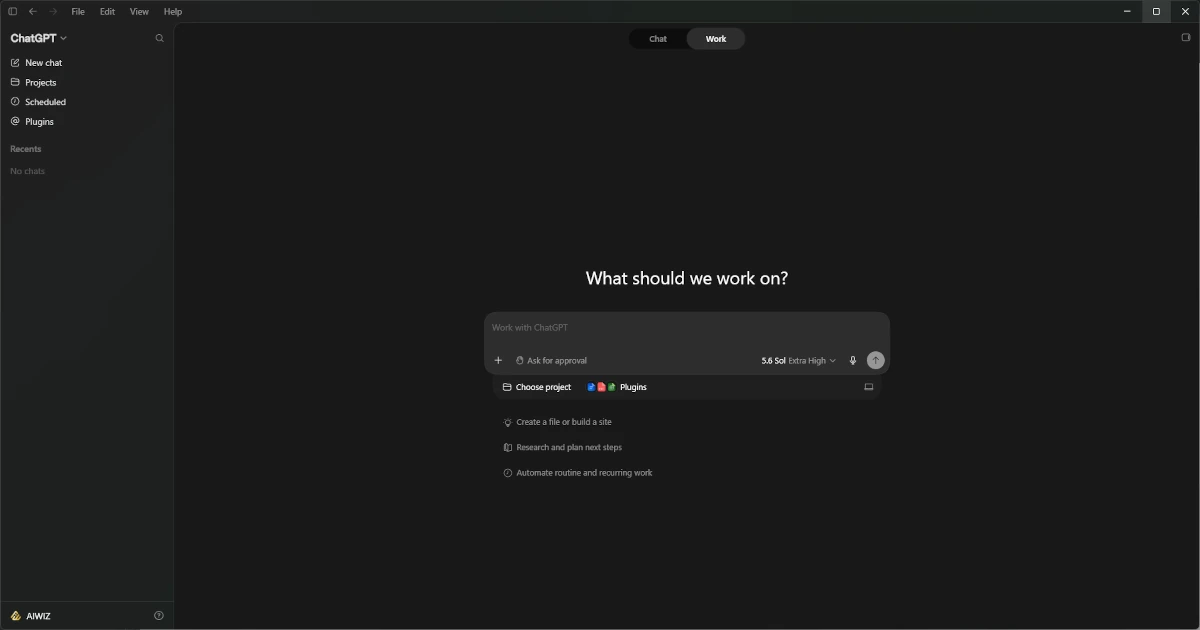
It has Codex technology built in, the coding agent more than five million people already use every week. At launch, Work used the GPT-5.6 model family: Sol for demanding work, Terra for everyday tasks and Luna for fast, high-volume jobs. OpenAI’s current Work guide now recommends GPT-6 Astra for demanding work that needs careful reasoning, visual judgement or a polished final file. GPT-5.5 retired from ChatGPT, Work and Codex on 14 October 2026; the API was not affected. Before it starts, you see a plan you can review and adjust, and you decide what it can access, when it checks in, and which actions need your approval. OpenAI’s launch announcement has the full rundown.
What does ChatGPT Work actually do?
Mostly, it turns source material into usable files without losing the thread between them. Ask ordinary ChatGPT for a campaign idea, and you get an answer in the conversation. Ask Work to prepare a campaign launch, and it can hold the same research, brand guidance and decisions steady across a brief, a content calendar and a deck, so the three files agree with each other.
Along the way, it behaves less like a text box and more like a contractor. It reads whatever you have connected, works out what is missing, asks when a gap matters and carries on through the steps, sometimes for hours. Scheduled Tasks extend this to recurring jobs: a weekly meeting pack that refreshes itself, or a report that assembles whenever new project updates land.
ChatGPT Work vs standard ChatGPT
Chat has not been replaced, and for a quick explanation or a draft you plan to shape yourself, it remains the better tool. Work earns its keep when the job has a clear end state and several things must happen before you get there.
If the table extends beyond the screen, scroll sideways to view all columns.
| Aspect | Chat | ChatGPT Work |
|---|---|---|
| Best suited to | Questions, brainstorming and quick analysis | Longer projects with several stages |
| Interaction | Conversational, directed by you, turn by turn | Goal-driven, with a proposed plan and progress tracking |
| Context | Prompts, files and search | Multiple files, connected apps, web sources and workflows |
| Outputs | Answers, drafts and single files | Coordinated documents, sheets, decks, reports and Sites |
| Control | You steer the conversation | You approve the plan and sign off on important actions |
| Duration | Minutes | Hours, or on a schedule |
How to use ChatGPT Work
The mechanics are simple. The quality of the result depends almost entirely on the brief.
- Switch to Work. Use the Chat, Work or Codex switcher to choose the experience that fits the job. Work is for a defined outcome that may need several sources, tools or deliverables.
- Choose where it runs. In the desktop app, keep Work locally selected when the task needs files or apps on your computer. If Cloud is available, choose it when the task should keep running after you close the app or turn off the computer, or when you want to continue from web or mobile.
- Start in the right place. A new conversation works, but choosing an existing Project brings its files, instructions and earlier decisions with it.
- Give it the material. Upload the relevant files and connect the apps this assignment needs through Plugins in the message box. Good context helps; indiscriminate access just widens the risk.
- Describe the result, not the task. Say what you want produced, who it is for and how it will be used. Include deadlines, tone of voice, branding, file format, formulas and anything that must not change.
- Set the review criteria. Ask for claims to be sourced, assumptions to be marked and gaps to be raised rather than quietly filled in.
- Check the proposed route. For involved work, answer its clarifying questions and review the steps before it starts. Correcting the route here is far cheaper than rebuilding files later.
- Monitor, approve, then read the thing. Configure the approval requirements for the assignment and keep consequential, external or hard-to-reverse actions behind a human check. Review the finished output properly before it goes anywhere near a client. A polished file can still contain a polished mistake.
One small habit worth forming: glance at the model picker before you send. OpenAI’s model guide suggests GPT-6 Astra for ambiguous problems and ambitious deliverables, GPT-6.1 Sol for complex tasks where time and cost also matter, GPT-6.1 Terra for screen-based workflows, concise writing and scoped code fixes, and GPT-6 Luna for scoped tasks and frequent automations; Plus includes all four. The models available depend on your plan and model selector, and more demanding choices can use the shared allowance faster.
Here is an example of a very concise brief that can be used as a starting point:
Prepare a 12-week UK launch plan for [product]. Use the attached customer research, proposition document and brand guide. Deliver a campaign brief in Word, a content calendar in Excel and a ten-slide internal deck. Keep every approved product claim unchanged, flag anything that needs evidence, write in UK English and stop for approval before doing anything outside ChatGPT.
OpenAI’s current ChatGPT Work guide covers local and cloud work, scheduled tasks and the mechanics in more detail.
What changed on launch day
On web and mobile, access opened with Pro, Enterprise, Edu, Plus and Business followed within days. On desktop, the redesigned app replaces the separate Codex application and covers every plan, including Free, while the old app lives on as ChatGPT Classic.
Two quieter changes arrived alongside it. Sites went into public beta, which lets a piece of work be published as a shareable web app with its own URL. And OpenAI confirmed it was winding down Atlas, its standalone browser, folding what it learned into ChatGPT itself and a Chrome extension. That wind-down is now complete: Atlas closed on 9 August 2026, ten months after it launched.
Who can use ChatGPT Work in the UK?
ChatGPT Work is available in the UK on every surface OpenAI offers, and what you get follows the plan you already have:
- Free and Go: a small amount of usage through the desktop app only, with GPT-6 Luna, subject to rollout
- Plus: access across desktop, web and mobile, with GPT-6 Astra, GPT-6.1 Sol, GPT-6 Sol, GPT-6.1 Terra and GPT-6 Luna
- Pro: three tiers at $100, $200 and $500 a month, with bigger allowances and the most capable model settings; Astra Ultrafast is on Pro 500
- Business, Enterprise and Edu: access governed by workspace administrators, who also get spend controls through the Admin Console
One change since launch sits just outside Work itself but affects the same plans: free ChatGPT accounts moved to GPT-5.6 Luna on 6 August, and OpenAI’s 7 October release notes say Free and Go now use GPT-6 Luna in Chat. We cover the change in our GPT-6 Sol guide.
Does ChatGPT Work have a separate price?
No. ChatGPT Work is included with eligible ChatGPT plans rather than sold as a separate subscription or add-on. Work and Codex share the same pricing, credits and usage limits, so the practical cost depends on the model, context, tools and length of the job.
OpenAI lists these US-dollar prices:
| Plan | Current listed price |
|---|---|
| Free | $0 per month |
| Go | $8 per month |
| Plus | $20 per month |
| Pro (Pro 100, Pro 200 and Pro 500) | From $100 per month: $100, $200 or $500 |
| Business, billed annually | $20 per user per month, minimum two users |
| Business, billed monthly | $25 per user per month, minimum two users |
| Business Premium seat | $100 per user per month billed annually, or $125 billed monthly |
| Enterprise and Edu | Contact sales |
If the table extends beyond the screen, scroll sideways to view all columns.
These are OpenAI’s US-dollar list prices. Local currency, VAT and other applicable taxes may change the amount charged. Premium seats, which can sit alongside standard seats in the same workspace, give five times the usage of a standard seat and remove the five-hour limit, according to OpenAI.
Pro allowances depend on the tier. Pro 200 subscribers who were active between 22 and 29 September 2026 kept their previous allowance until 29 October 2026, then moved to a lower allowance at the same price. Check OpenAI’s Pro tiers article for current limits rather than relying on a single multiplier.
Once the included usage runs out, Plus and Pro users can buy additional credits. Business, Enterprise and Edu workspaces on flexible pricing can buy shared workspace credits. OpenAI now publishes a dedicated Work usage-and-cost guide, including role-based planning examples and administrator controls. Its examples are directional rather than fixed per-user prices or guaranteed billing amounts.
On ChatGPT plans, local messages and cloud work share the plan’s usage allowance, and weekly limits may also apply. OpenAI shows its local-message estimates per five-hour period, but these are not fixed message limits. Consumption varies with the model, context, reasoning, tools and whether the task runs locally or in the cloud, so the usage dashboard is the best place to check current limits and reset times.
API pricing is separate. OpenAI’s recent GPT-5.6 price reductions apply when models are used through an API key. They do not change the ChatGPT subscription prices above. The OpenAI API pricing page lists the current token, context, batch and speed rates.
ChatGPT Work vs Claude Cowork: key differences
Put the two side by side, and the differences now sit less in basic surface coverage and more in plan availability, execution mode, connected tools and administrator controls. ChatGPT Work includes limited desktop access on Free and Go, with web and mobile from Plus upwards. Claude Cowork remains limited to paid plans, with web and mobile access on Pro and Max, in beta on Team, and on Enterprise where an owner has enabled it. Since 16 September, Anthropic has also been merging Cowork and chat into one Claude experience with a single message box for both, and its product page now says Cowork is part of Claude.
The timing was no accident, either. Cowork went generally available on 9 April and reached web and mobile on 7 July, two days before OpenAI’s launch.
If the table extends beyond the screen, scroll sideways to view all columns.
| Area | ChatGPT Work | Claude Cowork |
|---|---|---|
| Underlying technology | ChatGPT WorkCodex agent technology with GPT-6 Astra, GPT-6.1 Sol, GPT-6 Sol, GPT-6.1 Terra and GPT-6 Luna; GPT-5.6 models remain during the rollout | Claude CoworkClaude models |
| Desktop | ChatGPT WorkmacOS and Windows on every plan; Free and Go have limited usage | Claude CoworkmacOS, Windows and Linux on paid Pro, Max, Ultra, Team and Enterprise plans |
| Web and mobile | ChatGPT WorkPlus, Pro, Business, Enterprise and Edu, subject to workspace settings | Claude CoworkPro and Max; beta on Team; Enterprise where an owner has enabled it |
| Free access | ChatGPT WorkLimited desktop usage | Claude CoworkNone |
| Local files | ChatGPT WorkLocal desktop work can use approved files and apps; cloud work uses uploaded or connected sources | Claude CoworkLocal-folder work requires desktop; cloud sessions use uploaded files, account files and connected sources |
| Background work | ChatGPT WorkCloud work can continue after the app closes or the computer turns off; cloud scheduled tasks do not depend on the computer being awake | Claude CoworkCloud sessions continue across desktop, web and mobile; scheduled tasks can run with no device online |
| Browser work | ChatGPT WorkLocal Work can use the browser when that tool is available | Claude CoworkA built-in browser is available in the desktop app on Pro, Max, Ultra and Team; Enterprise administrators manage access |
| Maturity | ChatGPT WorkLaunched 9 July 2026 and available across eligible surfaces | Claude CoworkPaid-plan feature that Anthropic now describes as part of Claude; web and mobile are still in beta on Team |
See Anthropic’s current Cowork availability guide and its current Cowork product page for the latest surface and administrator details.
Strip the branding and the two ask the same things of a business: an outcome worth delegating, decent source material and firm rules about what needs a human. Neither vendor disagrees on that last point. The differences are in the plumbing.
Anthropic’s own research explains why both firms are fighting over the same ground. Of the 1.2 million Cowork sessions it sampled in May, business process and operations accounted for 33 per cent, content creation another 16 per cent, with software development under 9 per cent. The agents built by coding companies are being used to do ordinary office work.
Neither product can be judged from a spec sheet, and the deciding factor for most businesses will be unglamorous: which one already connects cleanly to your files, applications and approval process. Pilot one tool on one workflow you know well, measure what that workflow costs you today, and compare the result rather than the launch claims.
Where ChatGPT Work fits in a marketing or business team
This launch fits a pattern we watch closely through our answer engine optimisation work: the tools are now built to finish the job rather than describe it. And the question we ask clients about being found in AI search now applies inside the business too. Is your content, data and process structured well enough for an AI system to use?
That is the part the tech coverage keeps missing. An agent can only build a decent pipeline report or campaign analysis if your files, CRM records and brand guidelines are in order. Point it at a mess, and it will produce confident rubbish. Tidy naming conventions and a single source of truth for brand assets have quietly become AI infrastructure.
What that looks like role by role:
If the table extends beyond the screen, scroll sideways to view all columns.
| Team | Example input | ChatGPT Work task | Deliverable | Human check |
|---|---|---|---|---|
| Marketing | Brief, research, brand guide | Build a campaign plan | Brief, assets and presentation | Claims and brand compliance |
| Sales | CRM, email and meeting notes | Prepare account review | Account plan and follow-ups | Customer facts and permissions |
| Finance | Budget files and forecasts | Analyse variance | Spreadsheet and management deck | Formula and source validation |
| Operations | Project tools and messages | Prepare weekly review | Dashboard and action register | Ownership and deadlines |
The launch examples lean heavily towards marketing and commercial teams. Zapier’s head of enterprise marketing built a lead review system that analyses thousands of inbound leads a month across CRM and email, surfacing what OpenAI reports as seven figures in potential sales that follow-ups had missed. Virgin Atlantic’s digital team used it for competitor airline analysis, cutting cycles from weeks to hours. RingCentral automated its monthly launch checks across release plans and Jira, letting one efficiency manager support fifty product managers rather than one. All of these come through OpenAI’s own launch material, so read them as direction of travel rather than independent benchmarks.
What happened when we tested it
We ran our own test on 19 July, on a Pro plan through the desktop app with Sol set to Extra High. The brief: a fact-checked statistics pack on UK digital marketing, delivered as a 1,500-word report, an Excel register and a six-slide internal deck, with an exact source URL for every figure and firm instructions not to estimate, average or invent. It asked one approval question, proposed its plan immediately and then worked unattended for 32 minutes, using about three per cent of the week’s usage allowance.
It came back with 59 statistics drawn from five sources published by Ofcom, IAB UK, the DMA and DataReportal. We checked every one of the 59 against its cited source, and every one held up. Better still, it refused the bait: the universal email ROI multiplier and the “nobody scrolls past page one” figure were listed as could not verify rather than quoted, which is more discipline than plenty of human marketing content manages. The register, report, and deck agreed with each other exactly. The faults we found were cosmetic: a source name shortened inconsistently on one slide and a miscount in its own closing summary, which called five sources five publishers.
Doing this by hand, to that sourcing standard, we would budget a full working day, call it eight hours: two Ofcom reports to read, one of them long, plus the IAB, DMA and DataReportal releases, then the register, the report, the deck and the cross-checking. Reviewing the finished pack took around 45 minutes. That is a day’s deliverable for under an hour of human attention, most of it the review that nobody should skip. One run is a sample of one, and an easier brief to police than most. But on this evidence, the honest conclusion is the one in our verdict: a capable junior, and quick.
Budget deserves a thought as well. Local messages and cloud work share the plan’s usage allowance, with local-message estimates shown per five-hour period and possible weekly limits. A team that points Astra or Sol at every small job can use its included allowance far faster than expected, so track consumption in the usage dashboard and ask whether a smaller model would still justify the result.
Is ChatGPT Work safe for company data?
It can be used responsibly with company information, but the safety lives in the configuration rather than the product. Work reaches connected services through app permissions you grant, asks approval before sensitive or hard-to-reverse actions, and on desktop can use approved local files. That convenience makes permissions part of the brief itself, and someone senior should own them.
Enterprise and Edu administrators can restrict connected tools, company context and permitted actions centrally, and a Compliance API gives them visibility of conversations and actions. OpenAI states that data from Business, Enterprise and Edu workspaces is not used to train its models by default; its business data policy sets this out. Personal accounts carry different data controls, so a sole trader on Plus should not assume the same protections as an approved business workspace. Third-party apps connected to ChatGPT also keep their own terms and retention practices, which deserve the same review.
Before letting an agent loose on business data, it is worth confirming a few things:
- Your organisation has an actual policy on agent tools and company data, rather than leaving it to individual judgement
- Someone has documented which apps, folders and data types the agent may reach, particularly open Slack workspaces and shared drives
- Access is granted per assignment at the minimum level needed, never a whole workspace by default
- External messages, publishing and data changes always need human approval
- Generated documents and decks are treated as drafts until a named person has checked them
- There is a record of the brief, the sources used and who signed off before anything went external
Our verdict
ChatGPT Work is at its best on structured, multi-source tasks where the expected output is clear, and a person reviews the result. It is a poor fit for undocumented workflows, unsupervised external communication, or decisions that need accountable professional judgement.
In other words, it is a very capable junior. It still needs a manager.
The sensible starting point is small. Take one task the team already understands, record what it costs in hours today, then run the same job through Work for a fortnight. Measure the time saved after review, count the corrections, and note where the agent needed better data or a clearer rule. That will tell you more about the business case than any product demo.